
Brother · Label printers
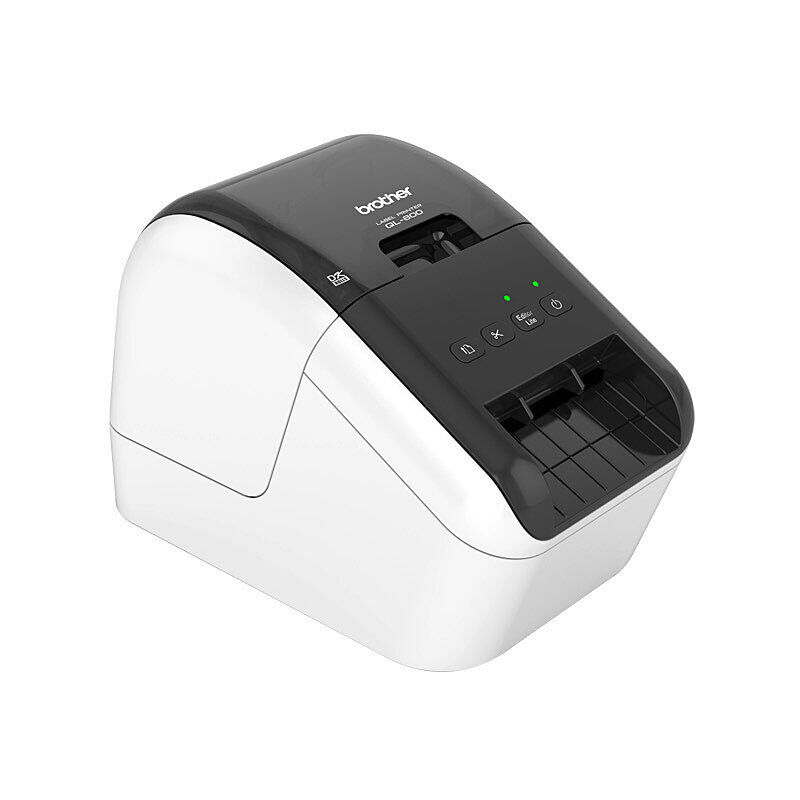
Brother QL-700 USB Desktop Label Maker
The QL-700 prints addresses, file labels and other office identification onto compatible Brother DK rolls. It uses direct thermal printing, so the roll is the printing medium and no ink or toner cartridge is needed.
$81.16
In stock
Useful features
At a glanceDirect thermal printing
Direct thermal printing: produces labels without an ink or toner cartridge.
Up-to-93-labels-per-minute
Up-to-93-labels-per-minute: applies to the specified address-label test and excludes Editor Lite mode.
DK die-cut and continuous rolls
DK die-cut and continuous rolls: offer fixed-size or custom-length labels.
Up-to-62 mm roll width
Up-to-62 mm roll width: gives the supported media-width limit.
59 mm maximum print width
59 mm maximum print width: distinguishes printable area from total roll width.
Automatic cutter
Automatic cutter: trims supported continuous labels after printing.
USB computer connection
USB computer connection: provides the host interface.
Windows Editor Lite
Windows Editor Lite: offers the built-in design route without installation.
Two starter rolls included
Two starter rolls included: supplies 100 address labels and an 8 m continuous roll.
The useful features
- Direct thermal printing: produces labels without an ink or toner cartridge.
- Up-to-93-labels-per-minute: applies to the specified address-label test and excludes Editor Lite mode.
- DK die-cut and continuous rolls: offer fixed-size or custom-length labels.
- Up-to-62 mm roll width: gives the supported media-width limit.
- 59 mm maximum print width: distinguishes printable area from total roll width.
- Automatic cutter: trims supported continuous labels after printing.
- USB computer connection: provides the host interface.
- Windows Editor Lite: offers the built-in design route without installation.
- Two starter rolls included: supplies 100 address labels and an 8 m continuous roll.
The useful details
Know what
you’re getting.
The QL-700 prints addresses, file labels and other office identification onto compatible Brother DK rolls. It uses direct thermal printing, so the roll is the printing medium and no ink or toner cartridge is needed.
Choose a DK die-cut roll for a fixed label size or continuous DK media for a custom length up to one metre. The automatic cutter trims continuous output. Brother rates the printer at up to 93 standard address labels per minute under its test mode; that speed does not apply to Editor Lite mode.
Future DK rolls must match the task and the 62 mm maximum width. This is a desktop label maker, not a plain-paper office printer.
The automatic cutter and continuous-roll option suit labels whose length changes between tasks, while die-cut media gives a repeatable preset size. The 93-label figure is a specific address-label test rather than the rate for every design. The printer requires compatible DK consumables; Brother TZe cassette tapes belong to a different printing system and do not fit.
USB direct-thermal label maker for Brother DK rolls with automatic cutting.
Address, parcel, file, shelf and inventory labels with suitable Brother DK rolls.
Home, office and business users needing desktop label printing.
A direct-thermal print head marks compatible DK media, then the cutter separates labels as needed.
A closer look
Specifications.
The details that matter.
Specifications
What’s in the box
1 unit QL-700 label maker
1 roll of 100 labels DK11201 address-label starter roll
1 8 m roll DK22205 62 mm continuous starter roll
1 cable USB cable
1 cable Power cable
1 set Quick setup guide and DK roll guide
Compatibility
Brother DK die-cut rolls or continuous DK media, maximum roll width 62 mm. Brother TZe tapes are a different system and not compatible.
App and setup
Install or launch the appropriate Brother label software, connect the interface and load a DK roll.
Keep the cutter and print head clear of fingers; use the Brother cleaning and roll-loading instructions. Unplug before maintenance.
Brother DK die-cut rolls or continuous DK media, maximum roll width 62 mm. Brother TZe tapes are a different system and not compatible.
Replacement compatible Brother DK rolls, sold separately.
Replacement compatible Brother DK rolls, sold separately.
1.1 kg manufacturer product page; brochure 1.12 kg excluding DK roll
128 × 153 × 221 mm
220–240 V AC 50/60 Hz, 0.9 A; USB 2.0 data connection.
Delivery and returns
GOOD TO HAVE